


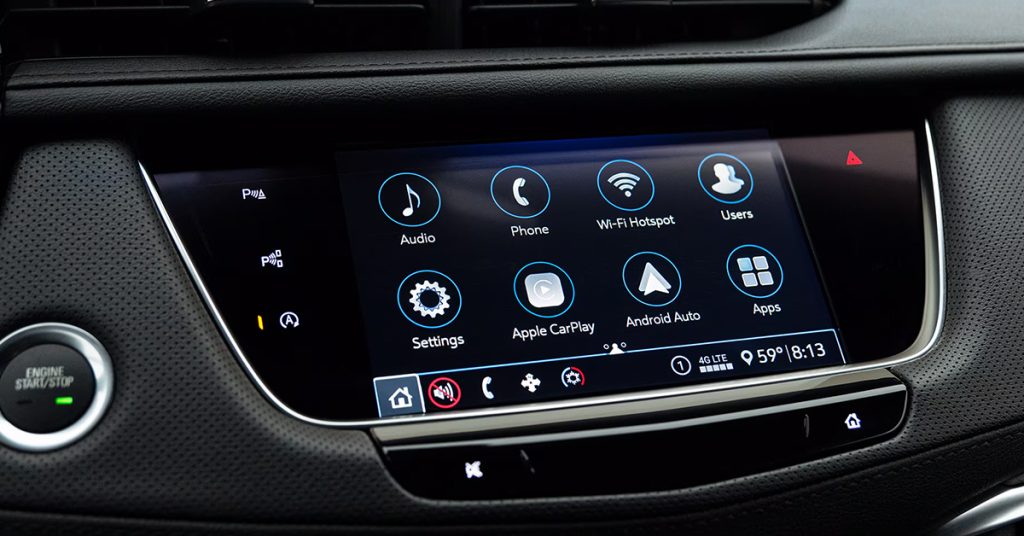
Staying connected on the road just got a whole lot easier with Cadillac’s built-in Wi-Fi hotspot. Whether you’re streaming your favorite shows, getting work done, or keeping the kids entertained during a long drive, Cadillac has you covered. With seamless connectivity that supports multiple devices, you can turn your vehicle into a mobile hotspot in just a few simple steps. Ready to take advantage of Cadillac’s cutting-edge technology? Let’s dive into how you can set up and maximize your Cadillac’s Wi-Fi capabilities, whether you’re cruising through Lake Wales, Waverly, or beyond. And if you’re looking for a Cadillac with all the latest tech, stop by Huston Cadillac or contact us to explore your options today!
Setting Up Your Cadillac’s Built-In Hotspot
Getting your Cadillac’s built-in hotspot up and running is quick and easy. Whether you’re driving a Lyriq, Escalade IQ, or XT4, Cadillac’s mobile hotspot feature ensures that you stay connected no matter where you are. All you need is a paid data plan, and you’re ready to start connecting devices. Let’s break it down into simple steps:
1. Download the myCadillac Mobile App
- The myCadillac app makes it easy to manage your vehicle’s built-in Wi-Fi settings from your phone.
- You can download the app from the App Store (for iOS) or Google Play (for Android).
- Once downloaded, open the app and follow the prompts to connect to your Cadillac’s hotspot.
2. Use Your Cadillac’s Touchscreen
- Alternatively, you can manage your Cadillac built-in Wi-Fi directly from your vehicle’s touchscreen.
- Tap the “Wi-Fi Settings” option in the vehicle’s settings menu.
- From here, you can set up your hotspot name (SSID) and password.
3. Choose Your Network Name (SSID)
- Your SSID is the name that will show up when you search for your Wi-Fi network.
- Pick something memorable and secure. You can even have fun with it—it’s your network!
4. Set Your Password
- Protect your network with a secure password to keep your Cadillac mobile hotspot safe from unauthorized connections.
- Make sure the password is something unique but easy for you to remember.
Once you’ve completed these simple steps, your Cadillac built-in hotspot will be ready to go! Whether you’re in the Escalade IQ, Lyriq, or XT4, you can connect multiple devices, from smartphones to laptops, and start streaming, gaming, or working without missing a beat.
Want help setting it up or need more info? Stop by Huston Cadillac, or contact us to get started!
Connecting to Your Cadillac Mobile Hotspot
Now that you’ve set up your Cadillac’s built-in Wi-Fi, it’s time to connect your devices. Whether you’re in the Lyriq, Escalade IQ, or XT4, connecting to your Cadillac mobile hotspot is easy. Here’s how to get your devices connected in just a few simple steps:
1. Turn On Your Vehicle
- Before connecting, make sure your Cadillac is on or in accessory mode.
- This ensures that your vehicle’s Wi-Fi is active and ready to go.
2. Find the Wi-Fi Settings on Your Device
- Go to the Wi-Fi settings on your phone, tablet, or laptop.
- This is usually found in the settings app under “Wi-Fi” or “Network.”
3. Select Your Cadillac’s Hotspot
- Look for your Cadillac built-in hotspot name (SSID) in the list of available networks.
- If you’re unsure of your hotspot name, check your vehicle’s settings or push the blue OnStar button for help.
4. Enter the Password
- Once you select your hotspot, you’ll be prompted to enter the password you set up.
- Make sure the password is entered correctly, paying attention to capitalization and any special characters.
5. Start Using the Connection
- Once connected, your device will be able to access the internet through your Cadillac mobile hotspot.
- You can now stream music, browse the web, or even work on the go. The Cadillac built-in Wi-Fi supports up to seven devices, so everyone in the car can stay connected.
Tips for a Smooth Connection:
- Check Your Signal: Make sure you’re within range of the hotspot. If you’re too far from your Cadillac, the signal may weaken.
- Data Usage: Keep an eye on your data plan. Streaming movies or large downloads can quickly use up your data.
With just a few steps, you’ll be ready to enjoy all the perks of a connected ride. Whether you’re heading out on a long road trip or just running errands, your Cadillac built-in hotspot makes staying connected easier than ever. If you need any assistance, don’t hesitate to visit Huston Cadillac or contact us for support!
Optimizing Your Cadillac’s Wi-Fi Hotspot Experience
To get the most out of your Cadillac built-in Wi-Fi, a few tips can help you enhance your connection and keep everything running smoothly. Whether you’re in the Lyriq, Escalade IQ, or XT4, optimizing your vehicle’s hotspot ensures you stay connected and enjoy a seamless experience while on the go.
1. Choose the Right Data Plan
- To maximize your Cadillac mobile hotspot, select a data plan that suits your needs.
- If you plan on streaming or using multiple devices at once, look for plans with higher data limits.
- Keep in mind that some vehicles may come with a free trial period for Wi-Fi services. Be sure to check if you qualify!
2. Limit Device Connections
- Although your Cadillac built-in hotspot can connect up to seven devices, it’s best to limit the number of devices connected at once.
- Too many devices may slow down the speed, especially if they’re all streaming or downloading large files.
3. Monitor Your Data Usage
- Keep track of how much data you’re using. This can help you avoid overage charges or running out of data mid-trip.
- The myCadillac app allows you to check your data usage and manage your plan easily.
4. Position Your Devices Correctly
- The signal strength of your Cadillac mobile hotspot can vary depending on your location.
- Try to keep your devices within close range of your vehicle to maintain a strong connection.
- Avoid heavy interference from objects or other wireless signals that might weaken your connection.
5. Turn Off When Not in Use
- If you don’t need the hotspot, turning it off will help conserve data and battery life.
- You can easily turn it off through the Cadillac’s built-in Wi-Fi settings on the touchscreen or in the myCadillac app.
6. Ensure Your Vehicle is Updated
- Periodically check for software updates for your vehicle. Keeping your system updated ensures the best performance for your hotspot.
- Cadillac frequently releases updates that improve Wi-Fi performance and overall connectivity.
By following these tips, you can enjoy a smoother and more reliable Cadillac built-in hotspot experience, whether you’re heading out on a road trip or just commuting around Lake Wales or Highland Park. Staying connected has never been easier, and with these simple steps, you’ll be able to get the most out of your Cadillac’s mobile hotspot.
Cadillac’s Built-In Hotspot for Your Road Trips
Your next road trip is about to get a lot easier with the Cadillac mobile hotspot. Whether you’re driving a Lyriq, Escalade IQ, or XT4, this feature will keep you and your passengers connected to the web, no matter where you’re headed. With Cadillac’s built-in Wi-Fi, your journey becomes a lot more enjoyable, whether it’s for work, entertainment, or staying in touch with loved ones.
- Stay Connected Anywhere You Go: No more relying on weak cellular signals or searching for Wi-Fi hotspots along the way. With a paid data plan, your Cadillac’s built-in hotspot gives you the power to connect up to seven devices. This means your family can stream movies, play games, or video chat while you focus on the road.
- Simple Setup for Seamless Travel: Getting started with the Cadillac mobile hotspot is easy. Simply connect your devices to your vehicle’s Wi-Fi. Once connected, you can use the web for streaming, browsing, and social media, just like you would at home. It’s a quick and hassle-free way to stay connected while on the move.
- Perfect for Long Road Trips: On long drives, the Cadillac built-in Wi-Fi can keep passengers entertained and make the journey go by faster. You can download movies, check emails, or get work done without interruptions. And if you’re traveling with kids, they can stream their favorite shows without draining the battery on their devices.
Important Tips for Road Trips
- Choose the right data plan: Depending on your travel plans, make sure you have enough data to cover the entire trip.
- Keep devices charged: Long hours of use may drain your devices, so make sure to bring chargers.
- Turn off when not in use: To save data and battery life, turn off the hotspot when no one needs it.
With Cadillac’s built-in Wi-Fi, your next road trip will be smooth, connected, and full of convenience. Ready for your adventure? Visit Huston Cadillac today to learn more about staying connected with your Cadillac mobile hotspot.
Safety and Security with Cadillac’s Hotspot
When you’re on the road, safety and security are top priorities. Cadillac’s built-in Wi-Fi offers more than just entertainment—it also provides peace of mind. Whether you’re driving a Lyriq, Escalade IQ, or XT4, your Cadillac mobile hotspot is designed with safety in mind.
1. OnStar Emergency Assistance
- In case of an emergency, you can easily contact OnStar through your Cadillac mobile hotspot.
- OnStar provides automatic crash response, vehicle diagnostics, and roadside assistance, all available through your vehicle’s built-in Wi-Fi.
2. Secure Connection for Your Devices
- Your Cadillac’s hotspot is encrypted, providing a secure connection for your devices.
- Whether you’re using a tablet or smartphone, your data is safe from unauthorized access.
3. Stay Safe with Wi-Fi Settings Control
- You can manage and control who connects to your Cadillac built-in hotspot.
- Set a password for added security and prevent unwanted users from accessing your network.
4. Remote Access via Mobile App
- The Cadillac mobile hotspot works seamlessly with the myCadillac app, allowing you to control settings remotely.
- You can check data usage, turn off Wi-Fi, or update your password from anywhere.
5. Safety Alerts for Your Vehicle
- Cadillac’s advanced safety features, like OnStar and remote vehicle management, can alert you to any issues with your vehicle while you’re connected.
- Your Escalade IQ or Lyriq will notify you of any critical issues, helping to keep you and your passengers safe.
By utilizing Cadillac’s built-in Wi-Fi, you’re not just staying connected—you’re ensuring your safety on every drive. Whether you’re on a long trip in your XT4 or navigating your daily commute, Cadillac’s hotspot features keep you secure and in control.
Is there a monthly fee for the built-in hotspot?
- Yes, there is a monthly fee for the Cadillac mobile hotspot. It typically requires a data plan, and the cost depends on the data package you choose.
How many devices can connect at once?
- Up to seven devices can connect to the Cadillac built-in hotspot at once, allowing multiple users to stay connected during your travels.
Does the hotspot work when the car is off?
- No, the Cadillac mobile hotspot only works when the vehicle is on or in accessory mode. It will not function when the car is off.
Get Your Cadillac Road-Trip Ready at Huston Cadillac
Now that you know how to get the most out of your Cadillac mobile hotspot, it’s time to explore more ways to enjoy your vehicle. If you’re located in Lake Wales, Waverly, Highland Park, or Alcoma, we invite you to visit Huston Cadillac and explore our wide selection of vehicles, including the Lyriq, Escalade IQ, and XT4.
Looking for more helpful tips? Our Buying Out Your Lease is Easy at Huston Cadillac guide can show you how simple it is to take ownership of your lease. If you’re interested in discounts after Hurricane Helene, we’ve got you covered with some great offers. Want to compare the 2025 Cadillac CT5 with the 2025 CT5-V? Our detailed comparison will help you make the best choice.
Ready to find your next vehicle? Check out our latest inventory of new vehicles here. Whether you’re looking for a luxury SUV or a stylish sedan, Huston Cadillac has the perfect car for you. Don’t hesitate to contact us for more information or assistance!
Connect with us


- July 2026
- June 2026
- May 2026
- February 2026
- January 2026
- November 2025
- October 2025
- September 2025
- August 2025
- July 2025
- June 2025
- May 2025
- April 2025
- March 2025
- February 2025
- January 2025
- December 2024
- November 2024
- October 2024
- September 2024
- August 2024
- July 2024
- June 2024
- May 2024
- April 2024
- March 2024
- February 2024
- January 2024
- December 2023
- November 2023
- October 2023
- September 2023
- August 2023
- June 2023
- May 2023
- March 2023
- February 2023
- January 2023
- December 2022
- November 2022
- October 2022
- September 2022
- August 2022
- July 2022
- May 2022
- April 2022
- March 2022
- January 2022
- December 2021
- November 2021
- October 2021
- September 2021
- July 2021
- June 2021
- May 2021
Archives